Cold Starts in AWS Lambda and How to Mitigate Them
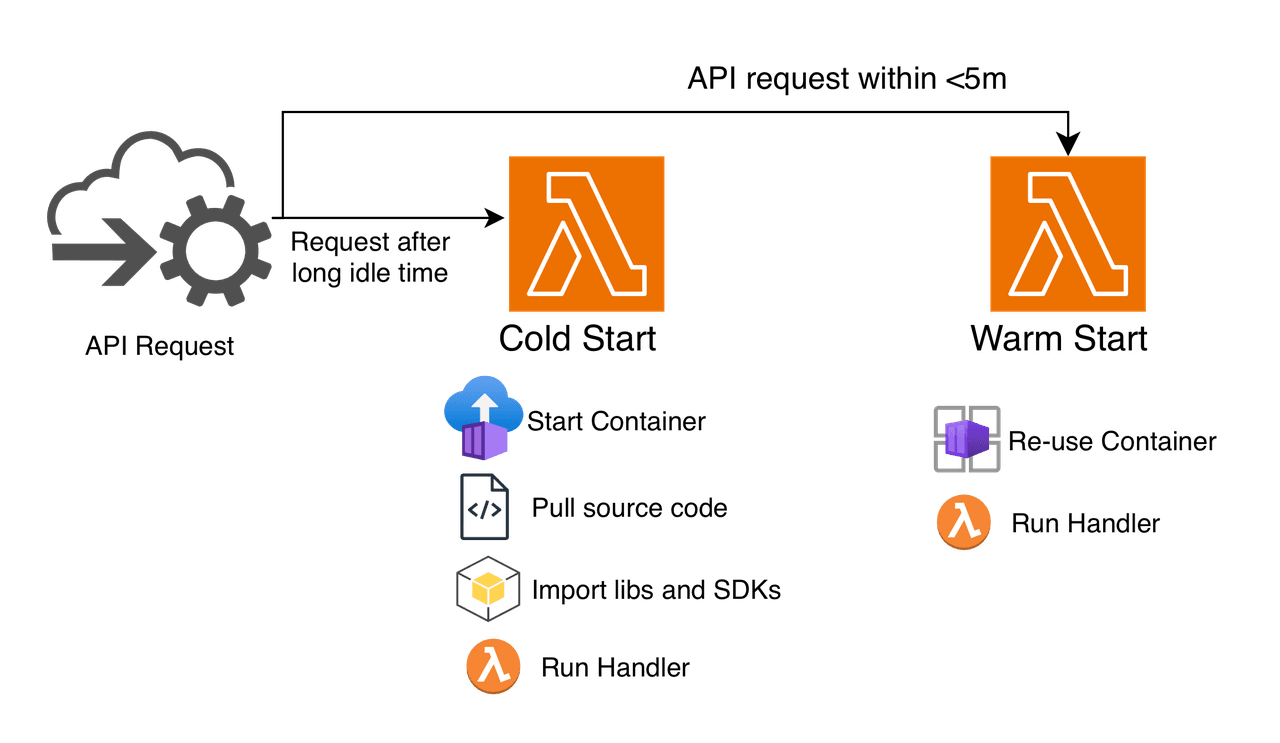
Cold starts were the hidden tax on my serverless bet. Here’s the short, practical playbook for warm starts, lower latency, and smaller bills.
The Early Startup Days
In the early days of my chatbot startup, we were "all in" on Serverless. The idea was simple: no servers to manage, infinite scaling, and pay-per-use billing. Back then, it felt like the future.
Reality showed up quickly. The complaints started coming in.
"Why does the bot take 5 seconds to say 'Hello'?"
That's when we realized we were hitting the cold start problem. Our Python code was heavy. It had to load NLP libraries, database drivers, and the AWS SDK. Whenever a new user showed up after a quiet stretch, AWS had to start a fresh container, pull down our code, and run all imports before it could handle even a single request.
I was desperate. I needed a fix, fast. So, I built what many of us did back then: The Infinite Pinger Loop.
I deployed a second Lambda function whose only job was to invoke my main Chatbot Lambda function every 5 seconds. It was a crude heartbeat to keep the execution environment "warm," so it wouldn't shut down. It worked... sort of. However, it was messy, it cluttered my logs, and it felt like I was fighting the platform rather than using it.
If I were rebuilding that chatbot today, here is exactly how I would handle the cold start problem.
The Reality Check: Why You Can't Ignore It Anymore
Before we get to the code, there's a hard truth worth calling out.
During the early 2020s, that 5 second initialization delay was annoying, but it was essentially free. AWS didn't charge for the Initialization phase. That changed in August 2025. AWS now bills for the time your function spends initializing.
Cold start optimization is no longer a nice to have for a better user experience. It is now a cost control problem. Ignoring it can cost you money for dead time before your code even runs.
Strategy 1: Stop Importing the World (Lazy Loading)
My first mistake with the platform was putting all my imports at the top of the file. I was importing the S3 client, the DynamoDB client, and a massive text-processing library, even for simple requests like a "Health Check."
The 5 Fix: Lazy Loading
In Python, imports are executable statements. They cost CPU time. The fix is simple: don't import it until you need it.
The Naive Way (Global Imports)
import boto3
import pandas as pd  # <--- This cost me 2 seconds on every cold start!

s3 = boto3.client('s3')

def handler(event, context):
    if event.get('action') == 'ping':
        return "pong"  # I paid the 'pandas tax' just to return this string
The "Pro" Way (Lazy Loading)
# Global variable to hold the client after first initialization
_s3_client = None

def get_s3_client():
    global _s3_client
    if not _s3_client:
        import boto3  # <--- Import happens ONLY when we actually need S3
        _s3_client = boto3.client('s3')
    return _s3_client

def handler(event, context):
    if event.get('action') == 'ping':
        return "pong"  # ZERO cold start penalty!

    # Only load heavy stuff for the heavy path
    s3 = get_s3_client()
# ... logic ...Strategy 2: The 'Save Game' Button (SnapStart)
This is the feature I dreamed about having back then.
AWS Lambda SnapStart (now supported for Python 3.12+) changes the physics of the problem. Instead of initializing a heavy chatbot on every cold start, AWS does the work once at deploy time. It then captures a Firecracker microVM snapshot, effectively a saved memory state, and caches it for reuse!
When a user messages the bot, AWS restores that saved state in milliseconds. The imports are already done. The variables are already loaded.
session_id) during that initial startup, it gets frozen in the snapshot. Every user who talks to your bot will get the same session ID. Disaster.We fix this with Runtime Hooks. We tell Lambda: "Pause before you snapshot, and run this cleanup code after you wake up."
import random
import boto3
from snapshot_restore_py import register_before_snapshot, register_after_restore

# 1. HEAVY LIFTING (Happens once at deploy time)
print("Loading heavy NLP models...")
s3 = boto3.client('s3')

# 2. STATE VARIABLE
current_session_id = None

@register_before_snapshot
def prepare_for_sleep():
    """Run this before AWS takes the snapshot"""
    global current_session_id
    current_session_id = None  # Wipe clean

@register_after_restore
def wake_up():
    """Run this INSTANTLY when the function wakes up"""
    global current_session_id
    # Generate a fresh ID for this new execution environment
    current_session_id = random.randint(1000, 9999)

def handler(event, context):
    return {
        "reply": "Hello human!",
        "session": current_session_id  # Unique every time!
    }
Strategy 3: Don't Make Them Wait (Response Streaming)
With my startup, users would stare at a "Typing..." indicator for seconds while the bot thought.
Today, we use Response Streaming. Instead of waiting for the bot to generate the entire paragraph, we stream the answer word by word, just like ChatGPT does. The user sees activity immediately, masking the cold start.
We do this using the Lambda Web Adapter and FastAPI. It allows your Lambda to act like a standard web server that streams data.
from fastapi import FastAPI
from fastapi.responses import StreamingResponse
import time

app = FastAPI()

def generate_bot_response():
    yield "Thinking...\
"
    # Simulate heavy processing
    for word in ["Hello", "there,", "I'm", "your", "assistant!"]:
        time.sleep(0.3)
        yield f"{word} "

@app.get("/chat")
def chat():
    # Browser gets the first byte in <100ms
return StreamingResponse(generate_bot_response(), media_type="text/plain")Closing Thoughts: The Right Approach in 2025
If I could go back and whisper in my own ear during those days, I'd say: "Delete the pinger loop."
Today, we solve cold starts by architectural design, not brute force.
Quick Reference Guide:
| If you are building...               | Use this...                                                                                          |
|--------------------------------------|------------------------------------------------------------------------------------------------------|
| A Standard API / Chatbot             | SnapStart: It's the default "best practice" for Python now.                                          |
| Generative AI / LLM App              | Response Streaming: Users are trained to expect streaming text; use it to hide the lag.              |
| Financial Trading / Real-time Gaming | Provisioned Concurrency: If 50ms latency costs you money, pay AWS to keep the lights on permanently. |
The tools are finally here. We can focus on building the bot, not fighting the infrastructure.
1. AWS Lambda standardizes billing for INIT Phase | AWS Compute Blog
2. From Seconds to Milliseconds: Fixing Python Cold Starts with SnapStart - DEV Community